第十八章:浏览器自动化与登录持久化(Camofox) {#ch:18}
本章对应 Astra 生态组件
astra-camofox-browser— Camofox 封装- Camoufox/Camofox — 反检测浏览器
18.1 什么是 Camofox?
Camoufox 是一个反检测浏览器,能够模拟真实用户行为,绕过网站的反爬虫检测。
18.2 典型应用场景
- 需要登录的网页:登录后保持 Session,Agent 无需每次手动认证
- 反爬严格的网站:模拟真实浏览器指纹
- 自动化表单填写:持久化 Cookie 省去重复登录
18.3 Camofox 与 Camoufox 的关系
Camoufox(daijiang1987/Camoufox)是一个基于 Firefox 的 C++ 级指纹伪装浏览器——不是简单的 JS 层面的 navigator 修改,而是在底层 C++ 代码中修改浏览器指纹。Camofox(jo-inc/camofox-browser)将其封装为一个 REST API 服务器,为 AI Agent 提供无障碍树快照、稳定元素引用、会话隔离和代理支持。
架构:
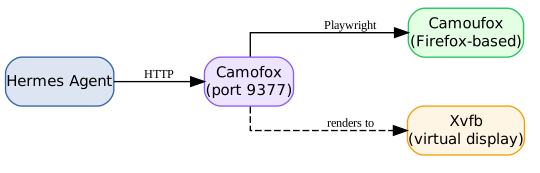
当 Hermes 的默认 Playwright/Chromium 被 Cloudflare、反爬严格的电商平台等拦截时,Camofox 是最佳替代方案。
18.4 安装与容器化部署
18.4.1 快速起步(npx)
18.4.2 生产级 Podman 部署
Astra 生态推荐使用 Podman(而非 Docker)进行容器化部署,以保持 rootless 安全和与 Astra 工具链一致。
前置条件:
| 依赖 | 用途 | 安装 |
|---|---|---|
| Xvfb | 无头 Camoufox 的虚拟显示 | zypper install xvfb-run(openSUSE) |
| Node.js >= 18 | Camofox 服务运行时 | 通常已随 Hermes 安装 |
| Firefox 系统库 | Camoufox 运行时依赖 | libgtk-3, libdbus-glib, libxt6 等 |
构建与运行(含 VNC + 持久化配置文件):
cd ~/Projects/astra/camofox-browser

# 下载 Camoufox 二进制(~680MB)
make fetch

# 构建镜像
make build

# 创建持久化卷
podman volume create camofox-profiles

# 启动容器
podman run -d \
  --name camofox-browser \
  -v camofox-profiles:/root/.camofox/profiles \
  -p 5900:5900 \
  -p 9377:9377 \
  -e ENABLE_VNC=1 \
  -e BROWSER_IDLE_TIMEOUT_MS=0 \
  localhost/camofox-browser:135.0.1-x86_64-vnc

# 验证
curl -s http://localhost:9377/health
# Expected: {"ok":true,"engine":"camoufox","browserConnected":true,...}
18.4.3 Podman 适配注意事项
Dockerfile 修改: Podman 的 podman build 不支持 --mount=type=bind,需替换为 COPY:
# ❌ Docker BuildKit only
# RUN --mount=type=bind,source=dist,target=/dist unzip /dist/camoufox.zip ...

# ✅ Podman & Docker 兼容
COPY dist/camoufox.zip /tmp/camoufox.zip
RUN unzip /tmp/camoufox.zip ... && rm /tmp/camoufox.zip
Makefile 修改: 所有 docker 命令替换为 podman,并添加 :Z SELinux 标签:
podman run -d --restart unless-stopped --name camofox-browser \
  -v ~/.camofox/profiles:/root/.camofox/profiles:Z \
  -p 9377:9377 ...
Rootless Podman 陷阱: 容器内 root 映射到你的主机用户。由其他用户拥有的 bind mount(如 root:root)即使 chmod 777 也会得到 EACCES。使用 podman volume create 代替 bind mount 存储配置文件。
18.4.4 已知问题与补丁
Camofox 当前有两个已知 bug(截至 2026-06),Astra 生态已在部署中打补丁:
| # | Bug | 症状 | 修复 |
|---|---|---|---|
| 1 | VirtualDisplay.get() 缺少 await |
日志显示 "display": {},Xvfb 无法启动 |
s/ = localVirtualDisplay.get();/ = await localVirtualDisplay.get();/ (server.js ~line 950) |
| 2 | Playwright 1.60+ 传递 isMobile 到 Firefox viewport |
Tab 创建失败:Protocol error (Browser.setDefaultViewport) |
方案 A(推荐): Pin playwright-core@1.58.0;方案 B: sed 删除 isMobile 行 |
补丁持久化策略 — Astra 分支:
git clone https://github.com/jo-inc/camofox-browser.git
cd camofox-browser
git checkout -b astra

# 提交四个补丁到 astra 分支
# 1. server.js: await VirtualDisplay.get()
# 2. Dockerfile: pin playwright-core@1.58.0
# 3. Makefile: docker → podman
# 4. plugins/vnc/vnc-watcher.sh: -displayfd 支持

# 定期 rebase 上游
git fetch origin master && git rebase master
所有补丁烘焙到 Dockerfile 或源码中,重建镜像时自动生效。
18.5 Hermes 配置
在 ~/.hermes/.env 中设置:
Hermes 的浏览器工具集自动检测此环境变量——无需在 config.yaml 中修改 browser.engine。
Camofox 选项:
| 环境变量 | 默认值 | 说明 |
|---|---|---|
CAMOFOX_PORT |
9377 |
监听端口 |
CAMOFOX_API_KEY |
(无) | 可选鉴权密钥 |
CAMOFOX_PROXY_URL |
(无) | 住宅代理 URL(增强反检测) |
18.6 登录凭据持久化与会话管理
18.6.1 核心挑战:跨轮次会话保持
关键限制: Hermes 在每个消息轮次之间清理浏览器会话。这意味着跨轮次的登录流程(输入手机号 → 等待验证码 → 输入验证码 → 登录)不能依赖 Hermes 的浏览器工具——会话在下一轮就消失了。
解决这个问题的关键是 持久化浏览器配置文件——将登录状态(Cookie、LocalStorage、Session)写入磁盘,使同一站点的后续访问能够复用已验证的会话。
18.6.2 配置文件持久化机制
Camofox 将浏览器状态保存到 ~/.camofox/profiles/<hash>/storage-state.json:
| Cookie 类型 | expires 值 |
容器重启后? |
|---|---|---|
Session Cookie(如 cookie2, _tb_token_) |
0 / -1 |
❌ 丢失 |
Persistent Cookie(如 t, tfstk) |
未来时间戳 | ✅ 有效直至过期 |
持久化策略:
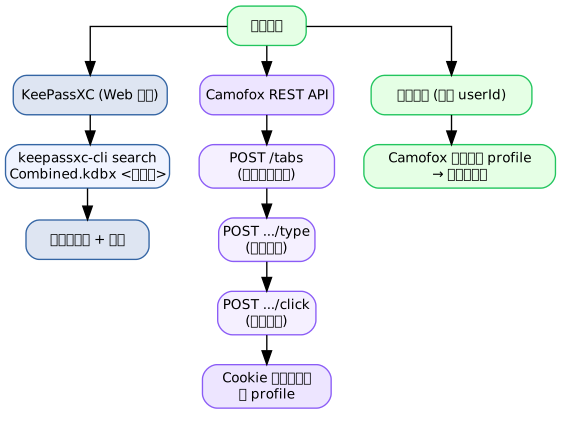
- 首次登录 — 使用 Hermes 的 credential 系统(见第十五章)获取网站凭据,通过 Camofox REST API 执行登录,浏览器 profile 自动持久化 Cookie
- 后续访问 — 指定相同的
userId/sessionKey,Camofox 自动从磁盘加载 profile,恢复已登录状态 - 定期刷新 — 对于 session-only Cookie 的站点,通过 cron 定期执行凭据登录刷新会话
18.6.3 通过 Camofox REST API 持久化会话
由于 Hermes 的浏览器工具在每轮后清理会话,需要直接调用 Camofox REST API(通过 execute_code() 或 terminal() 中的 curl)来维持跨轮次的登录状态:
| 操作 | 方法 | URL | 参数 |
|---|---|---|---|
| 创建标签页 | POST /tabs |
http://localhost:9377/tabs |
{"url":"...","userId":"X","sessionKey":"..."} |
| 获取页面快照 | GET /tabs/{tabId}/snapshot?userId=X |
— | — |
| 点击 | POST /tabs/{tabId}/click |
— | {"userId":"X","ref":"e5"} |
| 输入文本 | POST /tabs/{tabId}/type |
— | {"userId":"X","ref":"e2","text":"..."} |
| 导航 | POST /tabs/{tabId}/navigate |
— | {"userId":"X","url":"..."} |
| 截图 | GET /tabs/{tabId}/screenshot?userId=X |
— | — |
| 清理 | DELETE /sessions/{userId} |
— | — |
关键注意事项:
userId在 GET 端点中放 query params,在 POST 端点中放 JSON body- 为每个站点/账号创建固定的
userId和sessionKey,确保登录状态持续有效 - 标签页持续存在直到显式删除或 Camofox 服务重启
18.6.4 从凭据管理系统读取登录信息
Camofox 的登录凭据应通过第十五章描述的凭据管理系统获取:
18.6.5 登录状态验证
import requests

CAMOFOX = "http://localhost:9377"
USER_ID = "site_monitor_prod"

# 创建标签页并检查是否已登录
resp = requests.post(f"{CAMOFOX}/tabs", json={
    "url": "https://example.com/account",
    "userId": USER_ID,
    "sessionKey": "persistent_session"
})
tab_id = resp.json()["tabId"]

# 获取页面 snapshot 验证登录状态
snap = requests.get(f"{CAMOFOX}/tabs/{tab_id}/snapshot",
    params={"userId": USER_ID}).json()

# 检查 snapshot 中是否出现"登录"按钮(→ 未登录)或"我的账户"(→ 已登录)
is_logged_in = "my account" in str(snap).lower()
18.6.6 定期刷新策略
对于 Session Cookie 有效期较短的站点,通过 cron 定期执行凭据登录:
| 调度 | 操作 | 凭据来源 |
|---|---|---|
| 每日 06:00 | 刷新所有网站登录 | KeePassXC → Camofox |
| 容器重启后 | 自动恢复 profile 登录 | profile 磁盘文件 |
| Session 过期时 | 自动检测 → 重新登录 | KeePassXC 凭据查询 |
18.7 反检测浏览器策略全景
| 方法 | 可靠性 | 安装成本 | 状态 |
|---|---|---|---|
| Camofox 浏览器 | ✅ 高 | 中等(容器部署) | 推荐 |
| 浏览器直连 | ❌ 被封锁 | 低 | 不可行 |
| 代理 + 普通浏览器 | ⚠️ 中等 | 中等 | 部分可用 |
对于反爬严格的平台,Camofox 配合持久化凭据管理是当前 Astra 生态的推荐方案。